
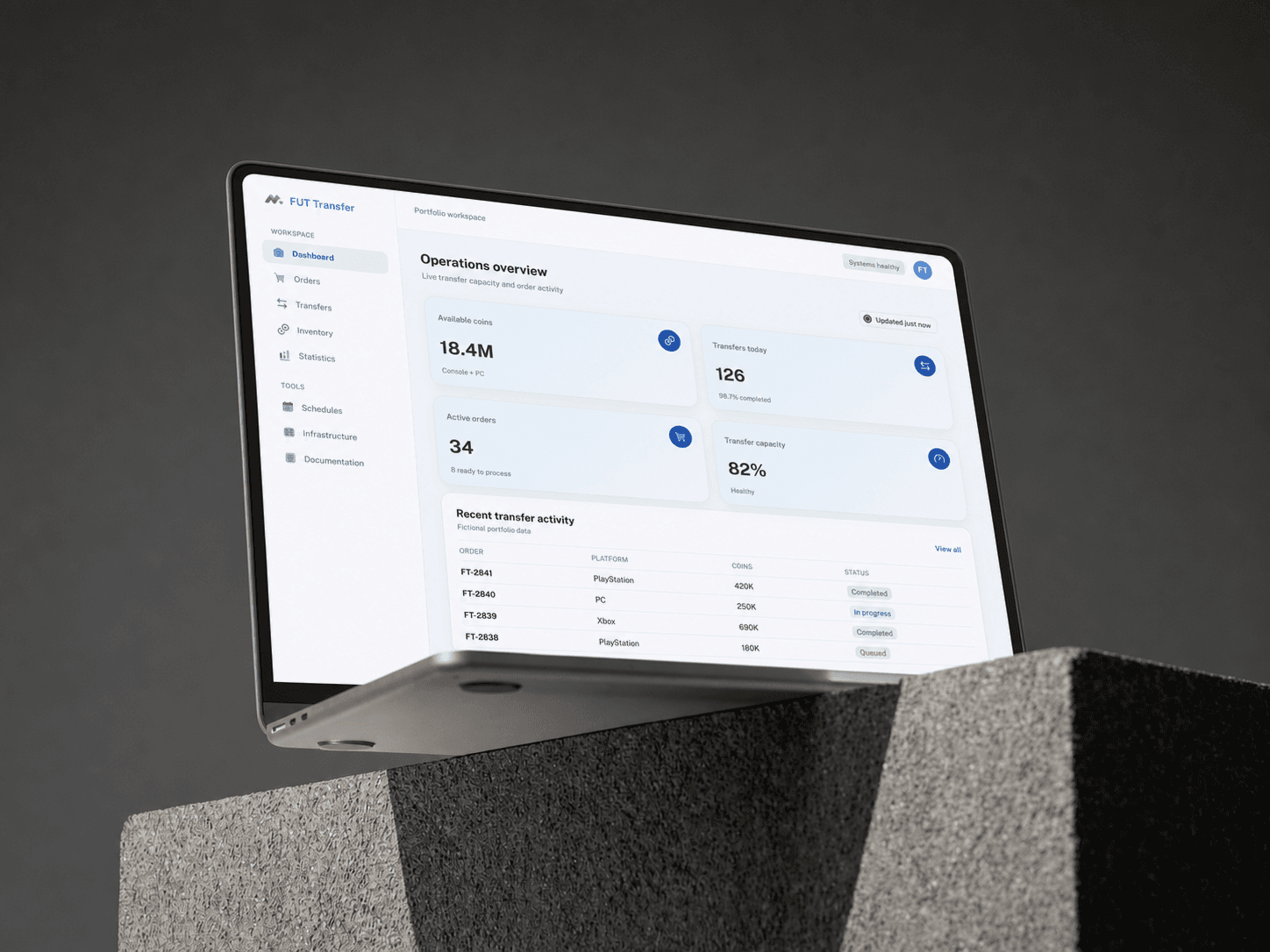
Making a dense operations platform easier to run
FUT Transfer supports a digital-goods operation where orders, account inventory, supply, transfers, and customer status all change throughout the day. The original platform could perform the work, but its interface made that work harder than it needed to be. Dense tables used different conventions, common actions were repeated in several forms, and operators had to rebuild the same filters each time they moved between views.
Priority Soft redesigned the operating experience around consistency and speed. We did not throw away years of domain logic to make a cleaner dashboard. We studied how the existing system was used, identified the patterns shared across its busiest screens, and built a reusable React interface that lets experienced staff move through large amounts of information with less friction.
The platform keeps the necessary operational detail while giving related tasks a consistent interface.
Learning the operation before changing the interface
Legacy software often contains important knowledge in awkward places. A strange filter may exist because one role needs it every morning. A duplicated action may reflect a real difference between two workflows. Removing those details without understanding them can produce a beautiful replacement that is less useful than the old system.
We reviewed the working platform screen by screen with the client. The review followed active orders, inventory and demand, account groups, transfers, supplier activity, customers, and payments.
That review separated genuine domain needs from accidental interface inconsistency. Some screens required specialized fields. Many others were variations of the same operating pattern: find a group of records, narrow the view, inspect status, select one or more rows, and take an allowed action.
Once that pattern was clear, we could redesign with confidence. The product kept its vocabulary and operational depth while gaining a much more predictable way to present it.
One table system for many kinds of work
Tables are the main working surface in FUT Transfer. They hold orders, transfers, accounts, sellers, payments, schedules, and historical records. Building each one independently would repeat the original problem with newer code.
A shared table framework handles columns, sorting, filters, selection, pagination, bulk actions, loading, empty states, and errors. Individual product areas define their data and actions without rebuilding the surrounding behavior.
This consistency has a direct effect on everyday use. Staff learn once how to adjust a view, select records, or open more detail. Status colors and action placement mean the same thing across the platform. A screen with a different dataset still feels familiar.
Improvements to table behavior now apply across several operational areas, while controlled extensions support specialized needs. New sections follow the same interface patterns as the platform grows.
Filters that preserve the operator's working context
In a high-volume operation, a filter can define an operator's recurring workload: a status, account group, seller, period, or exception that needs attention.
FUT Transfer keeps those choices close to the data and preserves them as the user navigates. Staff can return to a working view without rebuilding it from memory. Clear reset behavior makes it equally easy to step back to the full dataset.
Filters run in the interface or service according to data size and behavior. Large tables stay responsive without asking the browser to hold more information than it needs.
Exports follow the current view. When staff prepare a file for review or reconciliation, it reflects the same filters they used on screen. That makes the exported result easier to understand and reduces the chance that hidden records are included by mistake.
Dashboards that point toward action
An operations dashboard can become a wall of totals that looks important and answers no useful question. FUT Transfer needed summaries that help the team decide where to go next.
Role-aware dashboards cover active orders, transfer progress, inventory, payment state, and exceptions. A person monitoring delivery gets a different starting view from somebody reviewing customer accounts.
Summary cards open the corresponding filtered records. If a total indicates stalled work, the operator can see which items created it. The dashboard acts as an entry point to the work, not a decorative report.
The same principle applies to archives and statistics. Historical views remain available for review, while current work stays visually distinct. Operators can move between the immediate state and earlier activity without confusing the two.
Bulk controls with visible consequences
The value of an operations interface often comes from acting on several records at once. The risk comes from doing the wrong thing to all of them.
FUT Transfer supports row selection and bulk actions where the user's permissions and the record states allow them. Priority Soft standardized how selections appear, how available actions are presented, and when confirmation is required. The interface shows the scope of an action before it runs.
Results and errors remain connected to the selected work. If some records cannot be changed, the product can explain which ones need attention instead of presenting one vague failure for the whole batch.
Experienced operators can work fast without losing sight of a control's impact. Starting, stopping, assigning, archiving, and other actions use the same visual language and safety model.
Keeping customer access separate from internal operations
Customers need clear information about their own orders, balances, and account activity. They do not need access to supplier management, internal controls, or the broader operational picture.
Customer-facing views use the same underlying product information where appropriate, with a smaller set of records and actions. Internal permissions remain attached to operational roles, while customers see only the information associated with their account.
That separation makes the public experience easier to use. A customer can understand status without learning the language of the operations team. It also allows internal tools to become more capable without leaking complexity into the customer portal.
Identity, two-factor authentication, and permission-aware navigation enforce that boundary. Access rules determine whether a user can retrieve and act on the underlying information.
Responsive work without pretending every screen is mobile
FUT Transfer contains wide tables and dense operational controls that are naturally suited to a desktop. The product still needs to work on smaller screens when somebody is away from their usual setup.
Responsive behavior follows the task. Summary views, record details, navigation, and common actions adapt, while dense tables prioritize important columns and keep the rest accessible.
On a phone, operators can check status or handle an urgent action. The full desktop view remains the right place for sustained high-volume work.
The interface also supports several languages through a shared localization system. Labels and messages are treated as product content rather than hard-coded fragments, which helps the platform serve teams in different markets without redesigning each page.
A React foundation built for operational consistency
The web application uses React and JavaScript, with TanStack Query handling server-backed data and caching. Auth0 supports identity, while payment components are integrated into the views that require them. Internationalization resources and responsive layout rules are shared across the product.
The front end uses reusable tables, filters, bulk controls, modals, status treatments, and service modules. Product sections compose those parts without embedding network behavior and one-off interface logic in each page.
This structure makes the redesign possible in stages. Individual workflows can move onto the shared component system without waiting for the entire legacy product to be replaced. The client can improve the platform continuously while keeping important operational work available.
Sensitive account access, provider information, payment details, and automation controls stay behind the appropriate service and permission boundaries. The public case study focuses on the product architecture and operator experience.
What Priority Soft brought to FUT Transfer
The operation needs many data points, statuses, filters, and controls. We decided where that complexity belongs and made it consistent across the product.
We learned the existing workflows, preserved their domain logic, and built a component system capable of supporting them. We connected dashboard totals to actionable records, treated filters as part of the user's working context, and gave bulk controls a predictable safety model.
That approach let the client modernize without a risky all-at-once rewrite. Each redesigned area improves the experience while strengthening the common foundation used by the next one.
The outcome
FUT Transfer gained a clearer operating interface for managing digital-goods orders, transfers, inventory, customers, suppliers, payments, and schedules at scale. Staff can work from familiar table behavior, preserve useful filters, take controlled bulk actions, and move from summary information into the records that require attention.
Priority Soft turned a dense legacy dashboard into a reusable product system. The operation kept the depth it depends on, while the people running it gained an interface that is easier to learn and scan. The shared component model also gives future work a more consistent place to begin.