
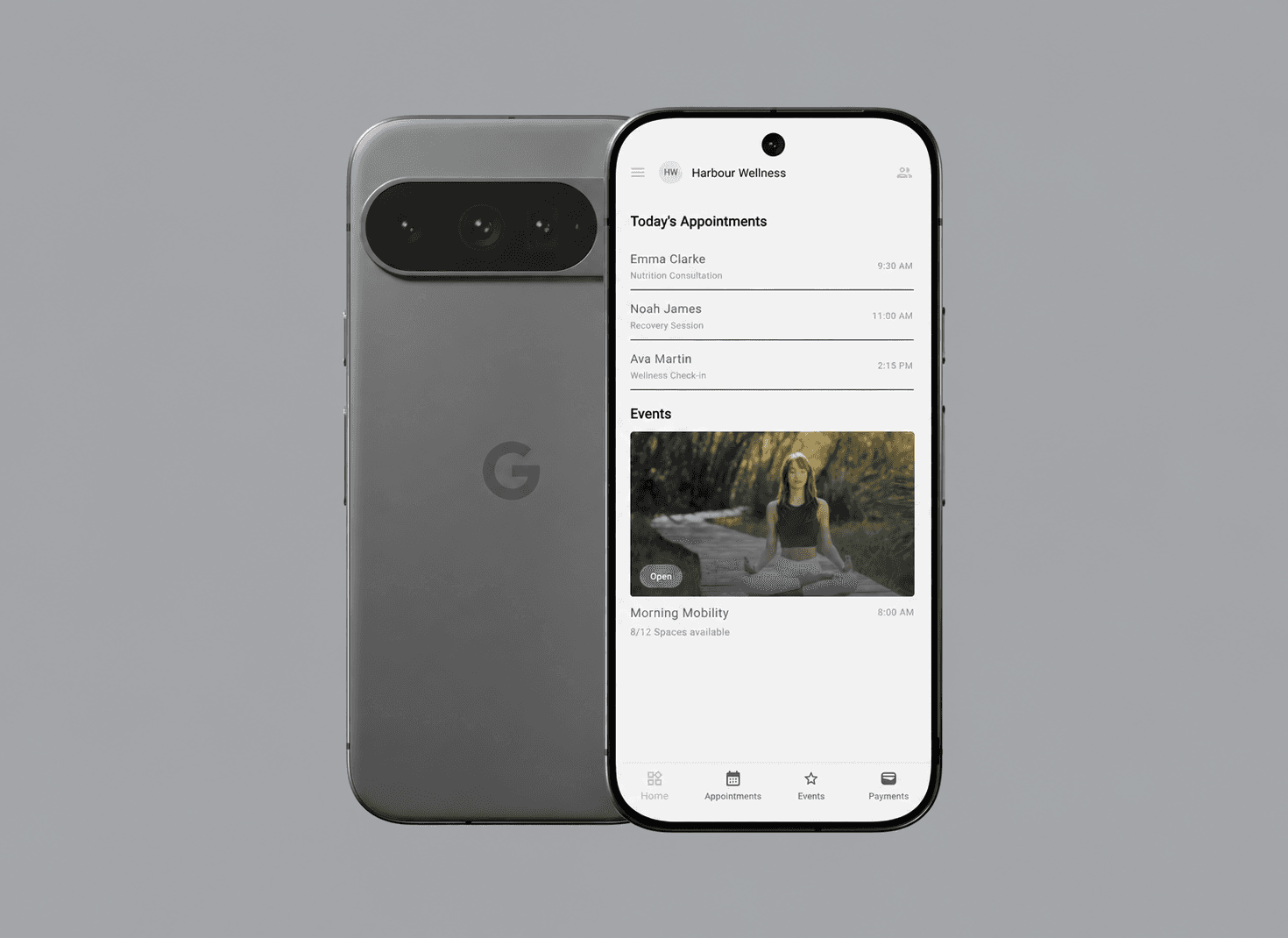
A mobile operating view for client-based services
For an appointment-based professional, the calendar is only the surface of the work. Each booking belongs to a person, may include notes or files, can require a questionnaire, may result in a payment, and often needs a reminder or follow-up.
Welloca brings those relationships into one mobile workspace. Staff can see today's schedule, move through week and month views, open an appointment, review the connected contact, update the visit state, manage events and participants, and inspect supported payment history.
Priority Soft built and refined the Flutter application as a practical companion to the client's existing service platform. The engagement included the mobile architecture, authentication, scheduling, contacts, events, questionnaires, payment presentation, release setup, and post-release improvements driven by real workflow friction.
A home screen organized around today
Mobile staff usually open an operations app because something is about to happen. They need the next appointment, the day's events, and a direct route to the relevant client information.
Welloca's home screen brings today's scheduled work into a concise agenda. Appointment and event cards communicate time, participant context, and current state without asking the user to open a full calendar first.
The home view is built for action. Tapping an item opens the relevant operational detail, while empty and loading states explain when nothing is scheduled or information is still arriving.
The application keeps future navigation available through the calendar and event areas. Home remains focused on the work most likely to matter during the current day.
Week and month views for different planning needs
A weekly calendar helps staff manage the next few working days. A monthly view gives a better sense of availability, event density, and dates that need attention.
Both calendar views use the same appointment records. Users can change the selected day, inspect its items, and open appointment detail without losing their calendar context.
Overlapping work, empty days, time zones, and the chosen first day of the week all affect a calendar. The team continued refining defaults and date behavior after release as different operations used the app.
The calendar is presentation, not authority. Appointment changes are confirmed through the service and then reflected across home, week, month, contact, and event views.
Appointment detail that brings the record together
Opening an appointment should answer who, when, where, and what needs attention. Welloca connects the scheduled time with the contact, location or delivery context, current status, notes, files, and supported payment information.
Appointment detail is divided into focused sections, so staff do not scroll through one long form during a busy day. Supporting material remains attached to the appointment while common actions stay easy to reach.
The app supports operational state changes for completed work or a missed appointment. Confirmed actions update the service record, not only the label on the phone.
Staff can also move into edit or reschedule behavior when a more substantial change is required. The original appointment context stays visible throughout the transition.
Creating, changing, and rescheduling work
Schedule changes are common, and mobile users should not need a desktop browser for every adjustment.
Welloca provides appointment forms for the contact, service context, date, time, location, and other supported details. Search and suggestion controls help staff find an existing contact without retyping the whole record.
Rescheduling has its own flow. The user can move the booking while preserving its relationship with the contact, notes, files, and existing history.
Validation catches incomplete or inconsistent inputs before submission. Success and failure messages remain tied to the action that produced them, and the surrounding calendar refreshes from the confirmed response.
Contacts tied to the work
In Welloca, a contact is the center of a service relationship. The record connects personal information with appointments, notes, questionnaires, reminders, events, and supported transaction context.
Contact search, lists, detail, and editing follow those relationships. Staff can move from a person to scheduled work or from an appointment back to the person without relying on duplicated names across screens.
Contact notes have a dedicated presentation so important context does not disappear into a generic description field. The mobile app also supports profile imagery and the document or web views required by the existing service workflow.
This public case study does not contain real client names, contact details, notes, files, questionnaire responses, or appointment histories.
Questionnaires available where staff need them
A questionnaire can provide information before an appointment or record follow-up after it. If it is hidden in a separate system, mobile staff may not know whether it exists.
Welloca exposes the questionnaire area through the authenticated application and connects available material with the appropriate client context. PDF and embedded web support let the app present formats supplied by the existing platform without reimplementing every form as native Flutter controls.
After release, questionnaire review showed that staff needed to find the right document from the part of the app where they were already working.
Responses and private form content remain in authorized product views. The mobile application does not publish or index client questionnaire data.
Events with participants and capacity
Group events require a different model from one-to-one appointments. They have a shared schedule, participant list, attendance state, and possibly a capacity or waiting list.
Welloca includes event discovery, detail, creation or modification, and participant management. Staff can inspect the event information, see who is attached, add eligible contacts, and update participant status.
The relationship works in both directions. An event can manage its contacts, and a contact can be assigned to an event through the selection flow.
After release, the team refined check-in behavior, participant assignment, and waiting-list presentation based on group operations in use.
Fast status actions with safe confirmation
Repeated administrative work benefits from gestures, but a swipe that changes a client record must be difficult to trigger by accident.
Swipe actions and compact controls cover common appointment operations. The visual treatment reveals the action before confirmation and keeps destructive or irreversible choices distinct from ordinary navigation.
The service response confirms whether the state changed. If a request fails, the app restores or refreshes the record so home and calendar stay in agreement.
This makes frequent actions faster without reducing them to invisible shortcuts that staff cannot review.
Payment history without becoming a payment vault
Service professionals may need to know whether an appointment has an associated payment, what its current status is, and how previous transactions relate to a client.
Welloca includes payment lists and transaction detail views. Priority Soft designed status labels, amounts, dates, and related context so staff can understand the product record without accessing sensitive card data.
Payment providers and additional collection methods appeared in post-release research. The available evidence does not establish every considered option as a released capability, so this case study limits its claim to the implemented transaction presentation and supported service integration.
The app does not store full card details. Private payments, processor records, refunds, and client financial information are excluded from the public story.
Multiple business contexts for one professional
Some users work across several businesses, locations, or account contexts. Mixing those records in one calendar would create serious operational mistakes.
Welloca includes an account selector that establishes the active business context before operational data is loaded. Home, appointments, events, contacts, questionnaires, and payments then work within that selection.
The active account remains visible and travels with service requests. Changing accounts refreshes the relevant data and prevents a client selection from carrying into the wrong business.
Actual business names, staff membership, account relationships, and cross-business activity remain confidential.
Authentication and multi-factor access
The application contains personal and operational records, so sign-in must protect access to both.
Authentication covers forgotten passwords, new passwords, and multi-factor verification. Secure local storage preserves only the session material appropriate for the device, and the application returns users to sign-in when the service no longer accepts that session.
Support access is available from the authentication area so a user who cannot sign in is not trapped behind the very screen causing the problem. Error messages distinguish invalid input, an expired challenge, and a service problem where possible.
Private access information, verification codes, support messages, session data, and service details do not appear in this case study.
Feature state that stays understandable
Appointments, events, contacts, payments, authentication, and navigation each have their own loading, success, empty, and failure behavior. Combining everything in one global state object would make changes difficult to reason about.
Welloca uses BLoC and Cubit modules by feature. Each area owns the events and states required for its workflow, while repositories provide the boundary to the existing service.
Immutable models represent service data, with reusable result handling for successful and failed requests. Shared providers make dependencies available without turning widgets into service locators.
This organization made post-release refinement safer. A calendar change could be tested in the appointment feature without rewriting contact or payment state.
A consistent mobile component system
The Flutter application includes reusable buttons, fields, dropdowns, checkboxes, switches, date and time pickers, tabs, dividers, app bars, image treatments, empty states, and feedback dialogs.
These components behave consistently across authentication and operational features as users move from an appointment to a contact or event.
The theme supports brand consistency while keeping status, warning, and error states distinct. Responsive constraints account for different phone sizes and for content such as long names or localized dates.
For this portfolio presentation, we rendered the existing home-screen structure from the verified Flutter repository and populated it with fictional appointment and event data. The visual demonstrates the product without exposing real practitioners, clients, schedules, or account information.
Release discipline and continued refinement
Separate application environments keep development and test records away from the released build. Automated release work reduces the manual steps in mobile delivery.
Production error reporting gives the team visibility into failures that may be difficult for field staff to reproduce. Environment tags help distinguish a test issue from a released problem.
The post-release backlog included calendar defaults, reminder visibility, staff absence, questionnaires, participant assignment, event check-in, time-zone behavior, and payment research. Not every idea became a released feature, and the case study does not present backlog work as completed.
What the record does show is continued attention after launch. Priority Soft treated operational friction as product evidence and refined the mobile experience accordingly.
High-level technical foundation
Welloca uses Flutter and Dart for the mobile application. BLoC manages feature state, while generated immutable models keep service responses consistent. A shared repository layer handles communication with the client's existing platform.
Secure storage supports authenticated sessions. PDF viewing, embedded web content, media selection, date and time controls, and calendar components cover the mixed native and service-driven workflows. Sentry provides production error visibility.
Separate development, staging, and production builds keep configuration and release behavior distinct. The public explanation omits private routes, record structures, environment addresses, access secrets, and deployment identifiers.
What Priority Soft brought to Welloca
The mobile product organizes a broad set of operational records around the staff member's day.
We connected schedule, appointment detail, contacts, notes, files, questionnaires, events, participants, payments, and account context without reducing the application to a desktop portal squeezed onto a phone. Quick actions and focused detail views make common work faster, while confirmation and service-backed state protect important records.
We also stayed involved after release. Calendar behavior, event participation, reminders, and payment options were reviewed against practical use, with unconfirmed research kept separate from implemented claims.
The outcome
Welloca was released as a mobile workspace for appointment-based service teams. Staff can authenticate with multi-factor support, see today's work, navigate week and month calendars, manage appointments, review connected contacts and questionnaires, operate group events, and inspect supported payment records.
Priority Soft delivered the Flutter product and continued refining it after release. The currently available distribution channel is not established by the project evidence, so this case study does not claim a current store listing, adoption, revenue, healthcare compliance, or payment certification.
The public story explains the product's value while keeping practitioners, clients, schedules, notes, questionnaires, payments, business accounts, support requests, and sensitive service details private.